MugArchive
A web application to catalog my Starbucks Discovery Series Ornaments collection
A Map That Holds My Collection Story
Some collections are about rarity; others are about places. For me, the Starbucks Discovery Series Ornaments collection belongs to the second type. Each piece is tied to a location, and over time the collection becomes a quiet record of where I have been and the memories attached to each stop. As the collection grew, I realized a simple list was not enough. I wanted something visual and instantly understandable. I wanted to see patterns, gaps, and progress at a glance. That is why I built MugArchive.
Why a Grid First Experience Works Better
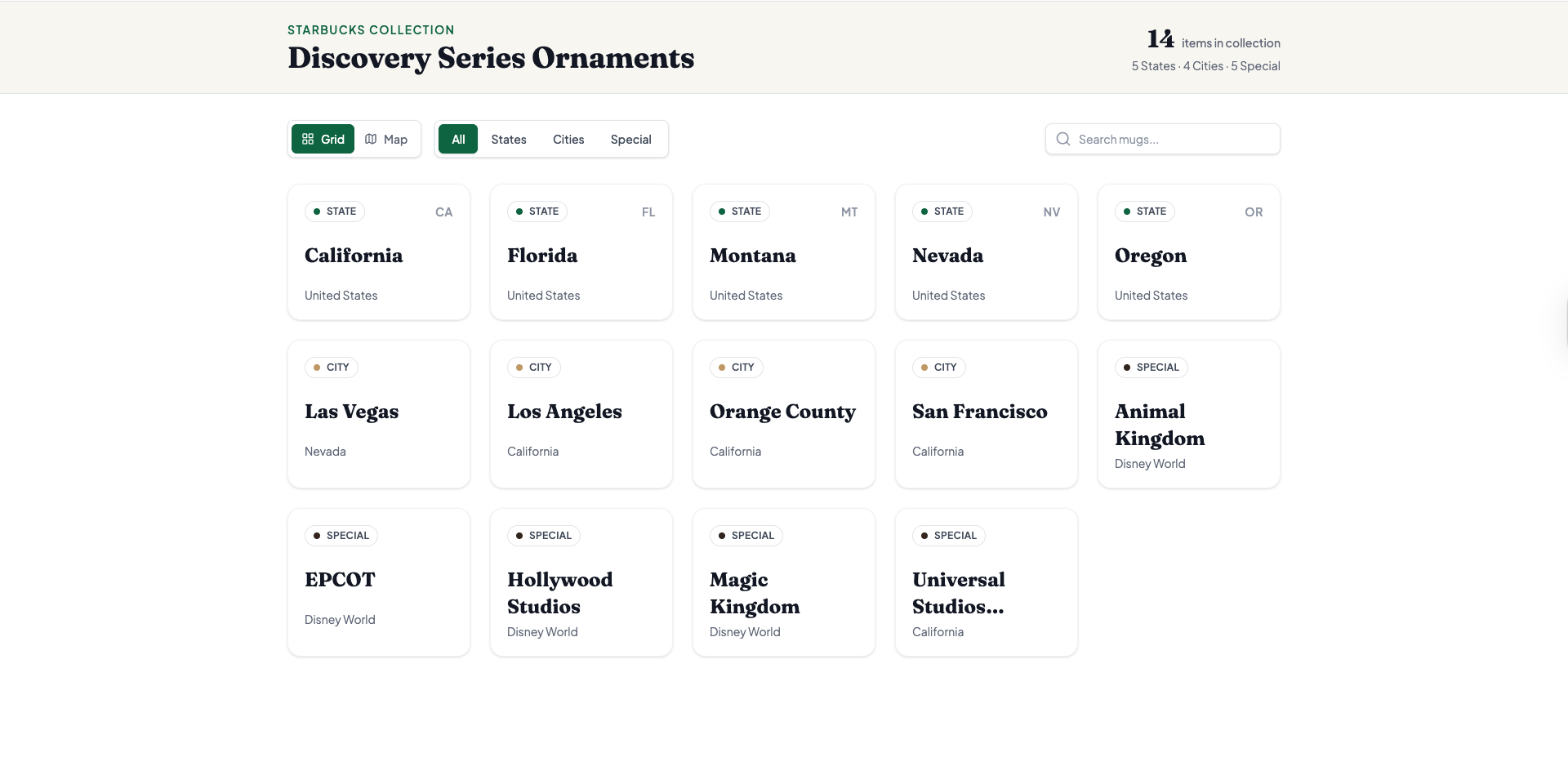
As the collection grew, I realized most of the time I did not want a map first. I wanted a calm catalog where I could scan items quickly, search by name, and filter by category. That is why MugArchive opens in a grid view by default. It feels like flipping through an organized collection book, not navigating a tool. The grid makes the archive easy to maintain and easy to revisit. When I want speed and structure, the grid is the best place to start.
When the Map Becomes the Second Perspective
A map still matters for this collection because location is the meaning behind many items. The map view is where the archive becomes more visual. It helps me understand the distribution across the United States, notice gaps, and explore by region. In MugArchive, the grid is for browsing and organizing. The map is for exploring patterns and places. Switching between the two is meant to be effortless so I can choose the view that fits the moment.
Categories That Match How Collectors Think
To keep things simple and consistent, MugArchive organizes items into three categories.
- States
- Cities
- Special items
Special items are for locations that do not fit the usual state or city framing. For example, theme park locations such as Disney World parks. This keeps the archive flexible without making it complicated.
Designing for Real Life
I built MugArchive for the situations where I actually use it:
- Browsing on a desktop when I want to compare items calmly
- Using a phone when I need quick search and quick filtering
- Sharing the site with a friend who just wants to understand what the project is at a glance
That is why the UI stays lightweight, responsive, and focused on a clean reading experience. The goal is not to overwhelm the user with controls. It is to make the collection feel organized and enjoyable.
How I Keep MugArchive Updated
MugArchive stays personal because the data is straightforward and editable. Whenever I add a new item or update existing information, I update a single file: src/data/mugs.js. This file exports MUG_DATA, which the app uses to render the map markers, the grid cards, and the dashboard counts. If you want to personalize your own copy of MugArchive, this is the main place to do it.
In practice, updating the archive usually looks like this:
- Add a new entry with a unique
idand a readablename - Set
categorytoState,City, orSpecial - For City and Special entries, include
stateIdpluslatandlonso the marker appears correctly on the map - Optionally include
groupto cluster related special items, such as “Disney World”
Here are simplified examples that match the current data structure:
// State
{
  id: "CA",
  name: "California",
  category: "State"
}

// City
{
  id: "san-francisco",
  name: "San Francisco",
  category: "City",
  stateId: "CA",
  lat: 37.774929,
  lon: -122.419418
}

// Special item
{
  id: "disney-world-epcot",
  name: "EPCOT",
  category: "Special",
  group: "Disney World",
  stateId: "FL",
  lat: 28.3747,
  lon: -81.5494
}
If you want to change how categories are displayed in the UI, you can also edit CATEGORY_LABELS in the same file. For example, you can rename “Special” to something that matches your collection style while keeping the underlying key unchanged.
The Tech Behind the Experience
MugArchive is built to stay simple as the collection grows. Instead of relying on a backend, it uses a lightweight, data-first structure and a fast front-end toolchain.
- React renders the catalog views and UI state
- Vite provides a fast development and build workflow
- Tailwind CSS keeps the layout and typography consistent across pages
- Lucide React adds clean icons for controls and navigation
- ESLint enforces code quality as the dataset expands
Why MugArchive?
Because a collection is more than a list. It is a pattern across places, a set of memories, and a long-term project that grows quietly. MugArchive is my way of keeping that story organized, visible, and enjoyable to revisit.
Notes and Attribution
- The base SVG map is sourced from amCharts SVG Maps.
- Starbucks Discovery Series is a trademark of Starbucks Corporation.