ParkMarks
An interactive map application to record and track my U.S. National Parks journey
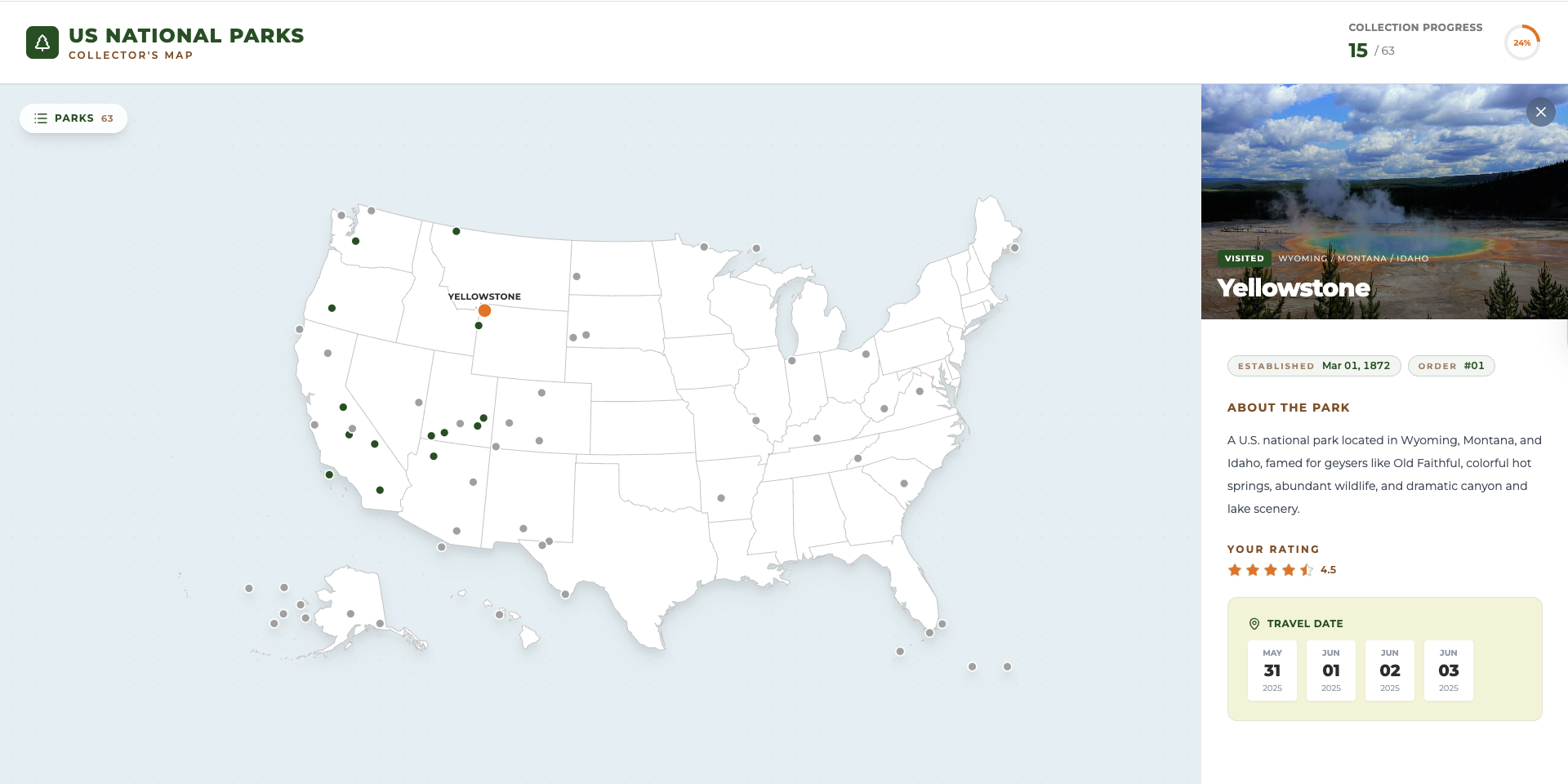
A Map That Holds My National Parks Story
Some trips are easy to forget until a photo pops up years later and pulls you right back in. National parks feel different. They leave behind more than pictures: a trail you hiked in silence, a sunrise you waited for in the cold, and a small detail you did not notice until a second visit. Over the years, I realized I was not simply checking parks off a list. I was building a personal timeline of places that shaped how I travel. ParkMarks started from that idea. I wanted a single, calm place to record which parks I have visited over the years, what those trips meant to me, and which parks are still waiting for a future chapter.
From a Simple Idea to Something I Actually Use
At first, I thought I only needed a checklist. But a checklist does not feel like a journey; it feels like a task. I wanted something more visual, calmer, and closer to how travel memories actually work. So I built ParkMarks with the map as the starting point. The map is not just decoration; it is the main interface. When you move across the United States, states respond, the geography feels alive, and parks appear as places you can return to, both literally and emotionally. Clicking a marker opens the park details, and that is where the app shifts from map to journal.
What I Wanted the App to Capture
When I look back at a park, I usually remember either the first time I saw it or the way it felt when I returned. That is why ParkMarks supports multiple visits for the same park. A revisit is not a duplicate; it is part of the story. I can also leave a personal rating, not as a score for the park itself, but as a reflection of that particular trip: the weather, the season, the mood, and the people. And because travel planning is part of travel, I can keep parks in a Wishlist, a gentle reminder of what I am drawn to next.
Designing for Real Life
I wanted ParkMarks to work in the situations where I actually think about parks:
- Planning on a desktop when I have time to browse
- Checking details quickly on a phone
- Sharing a park with a friend using a single link
The layout adapts to different screens. On mobile, the park details open in a bottom sheet style panel so the map remains visible. I can also share a specific park using a URL parameter such as ?park=<slug-or-id>, so someone can land on the exact park I am talking about without extra searching. Browser navigation also stays natural, so back and forward behave as you would expect.
How I Keep ParkMarks Updated
ParkMarks stays personal because the data is straightforward and editable. I treat it like a small, structured travel diary. Whenever I come back from a trip, or when I remember an older trip I never logged, I update a single file: src/data/parks.js. That file contains the park entries the app reads to render markers, details, and my visit history. If you want to personalize your own copy of ParkMarks, this is the main place to do it.
In practice, updating the log usually looks like this:
- Mark a park as visited when you have been there
- Add one or more visit dates (I keep them in a consistent format like
YYYY-MMM-DD) - Update a rating to reflect how that visit felt
- Optionally swap the image if you want a different memory attached to the park
Here is a simplified example of what a single park entry can look like:
{
  id: 1,
  name: "Yellowstone",
  fullName: "Yellowstone National Park",
  state: "Wyoming / Montana / Idaho",
  lat: 44.6,
  lon: -110.5,
  established: "1872-Mar-01",
  visited: true,
  dates: ["2025-May-31", "2025-Jun-01", "2025-Jun-02", "2025-Jun-03"],
  rating: 4.5,
  image: "images/yellowstone.jpg",
  desc: "A U.S. national park located in Wyoming, Montana, and Idaho...",
}
If you add your own photos, make sure the image path matches where the file is stored, commonly under public/images/ in the project. After editing, you can run the app locally to preview changes, then redeploy when you are happy with the updates.
What I like about this approach is that it is durable. The data is not hidden behind a complicated backend. It is just a file I can maintain over the years, the same way I maintain the habit of traveling.
The Tech Behind the Experience
ParkMarks is built with modern tools, but the goal is not to be “techy.” It is to be fast, clean, and easy to maintain.
- React drives the UI and interactions
- Vite keeps development and builds snappy
- Lucide React provides lightweight icons
- ESLint helps keep the codebase consistent
Why ParkMarks?
Because every park deserves a mark, not just a checkbox, and every visit becomes part of a larger story. A mark that says: I was here, this mattered, I want to return, I am not done yet. ParkMarks is my companion for that kind of journey, one park at a time.
Notes and Attribution
- The base SVG map is sourced from amCharts SVG Maps.
- Park coordinates and basic park information are derived from public National Parks datasets.